Blog

Author: Claudio Ribeiro

News

MXR launches the New Turbo Tuner M400

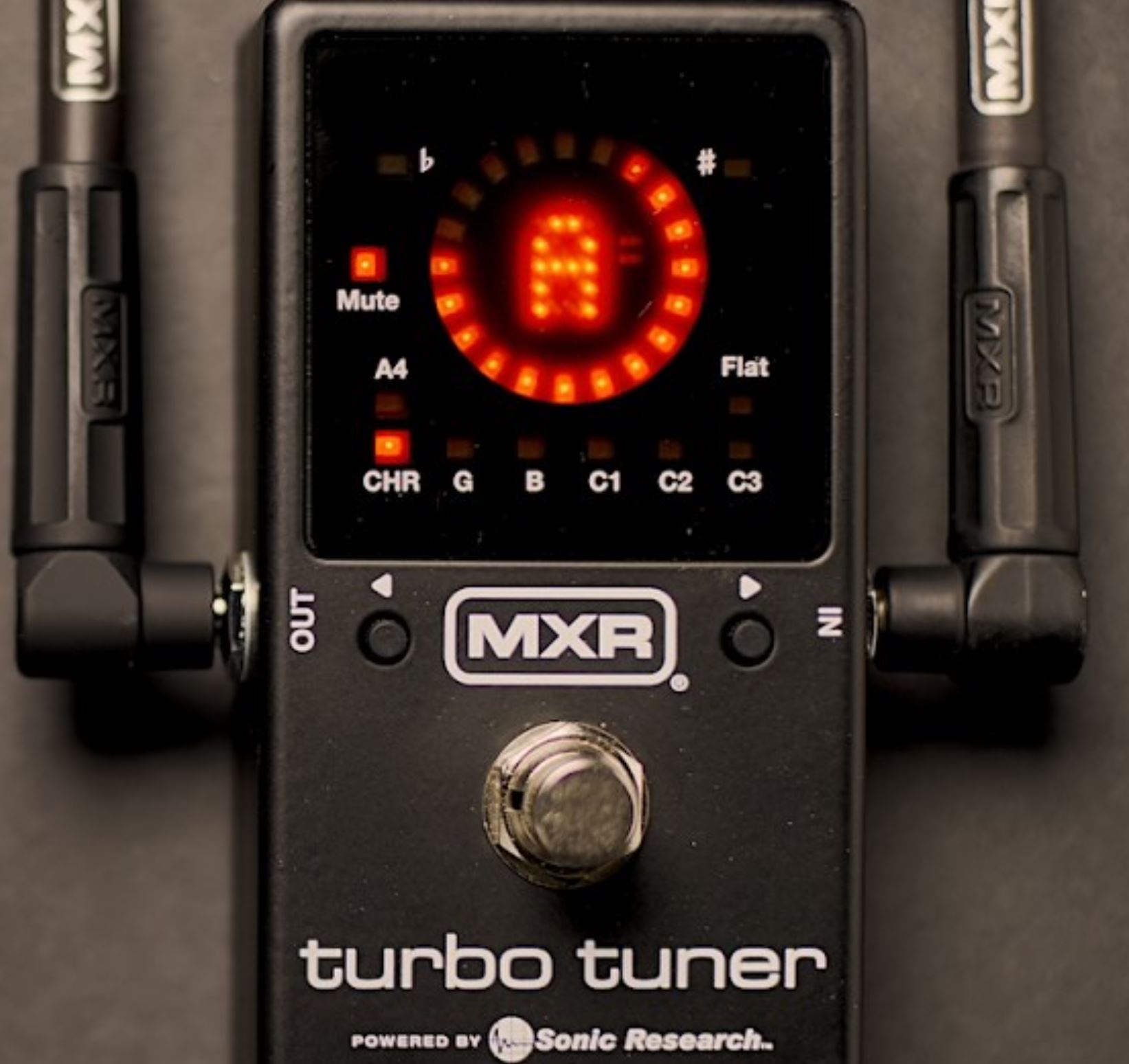
MXR Enters the Tuner Market with the New Turbo Tuner M400 Built around Sonic Research’s precision strobe technology, MXR’s first-ever tuner pedal promises extreme accuracy, extensive tuning customisation, and flexible signal routing. MXR is stepping into new territory with the launch of the Turbo Tuner M400, the brand’s first-ever tuner pedal. Developed in collaboration with Sonic Research, the new stompbox brings the company’s renowned Turbo Tuner technology into a compact MXR enclosure, combining professional-grade tuning accuracy with a feature set designed for both guitarists and bass players. At the heart of the M400 is a true strobe tuning system rated at ±0.02 cents of accuracy. Alongside its high-precision tuning capabilities, the pedal offers programmable presets, alternate temperaments, adjustable display brightness, and a choice between true bypass and buffered operation. Precision Tuning with a True Strobe Display The M400 uses a genuine strobe display rather than a simulated needle or conventional moving indicator. Its LED ring responds to pitch variations, rotating in one direction when a note is sharp and the opposite direction when it is flat. As the instrument approaches the correct pitch, the movement slows until the display settles. MXR rates the tuner’s accuracy at ±0.02 cents across a range from C0 to C8, making it an exceptionally precise option for players who demand fine adjustments when tuning their instruments. For bass players, that precision is particularly relevant when setting up an instrument, matching tuning across multiple basses, or working with extended-range instruments where consistent intonation and tuning stability are essential. The display also features four brightness settings, allowing players to adjust visibility for different environments, from dim rehearsal rooms to brightly lit stages and outdoor performances. Designed for Everyone The Turbo Tuner M400 includes chromatic mode, which tracks all twelve notes, alongside dedicated guitar and bass modes that identify strings by number rather than note name. It also provides five programmable instrument presets, including three additional slots initially configured for standard guitar, Drop D, and six-string bass tunings. These presets can be customised for instruments with up to 12 strings, with tuning offsets adjustable in 0.1-cent increments across a range of ±50 cents. The pedal also supports alternate temperaments, giving players the ability to move beyond standard equal temperament and customise tuning for particular musical requirements. For bass players experimenting with alternate tunings, extended-range instruments, or non-standard musical systems, this level of flexibility makes the M400 more than a conventional plug-in-and-tune pedal. True Bypass or Buffered Operation The M400 offers a choice between true bypass and buffered operation, allowing players to configure it according to their signal chain. In true-bypass mode, the pedal mutes the output while tuning and removes itself from the signal path when switched off. Buffered operation provides three selectable configurations: muting the output while tuning, keeping the instrument signal active while the tuner runs, or leaving the tuner active and using the footswitch as a mute. The buffer option is particularly useful for players running long cable lengths or larger pedalboards, where maintaining high-frequency response can become a consideration. Compact Design and Practical Connectivity The Turbo Tuner M400 follows the familiar MXR stompbox format, with a die-cast aluminium enclosure designed to integrate easily into an existing pedalboard. Its connectivity includes standard instrument input and output connections, a 9V DC power input, and a dedicated output for passing power to another pedal. A USB-C connection supports firmware updates and access to the tuner’s editing software. The pedal can also run from a 9V battery, providing an alternative for players who prefer not to rely exclusively on an external power supply. Pricing and Availability The MXR Turbo Tuner M400 has a US suggested retail price of $149.99 and is beginning its rollout through retailers. European pricing and availability may vary by market. By combining Sonic Research’s established strobe tuning technology with MXR’s familiar pedal format, the M400 represents a significant addition to the brand’s catalogue. For bass players looking for a compact tuner with extremely fine accuracy, extensive preset customisation, and flexible signal-routing options, MXR’s first entry into the tuner market is certainly one to watch.

Joyo Band Controller
Reviews

Joyo R-12 Band Controller: Pedal Review

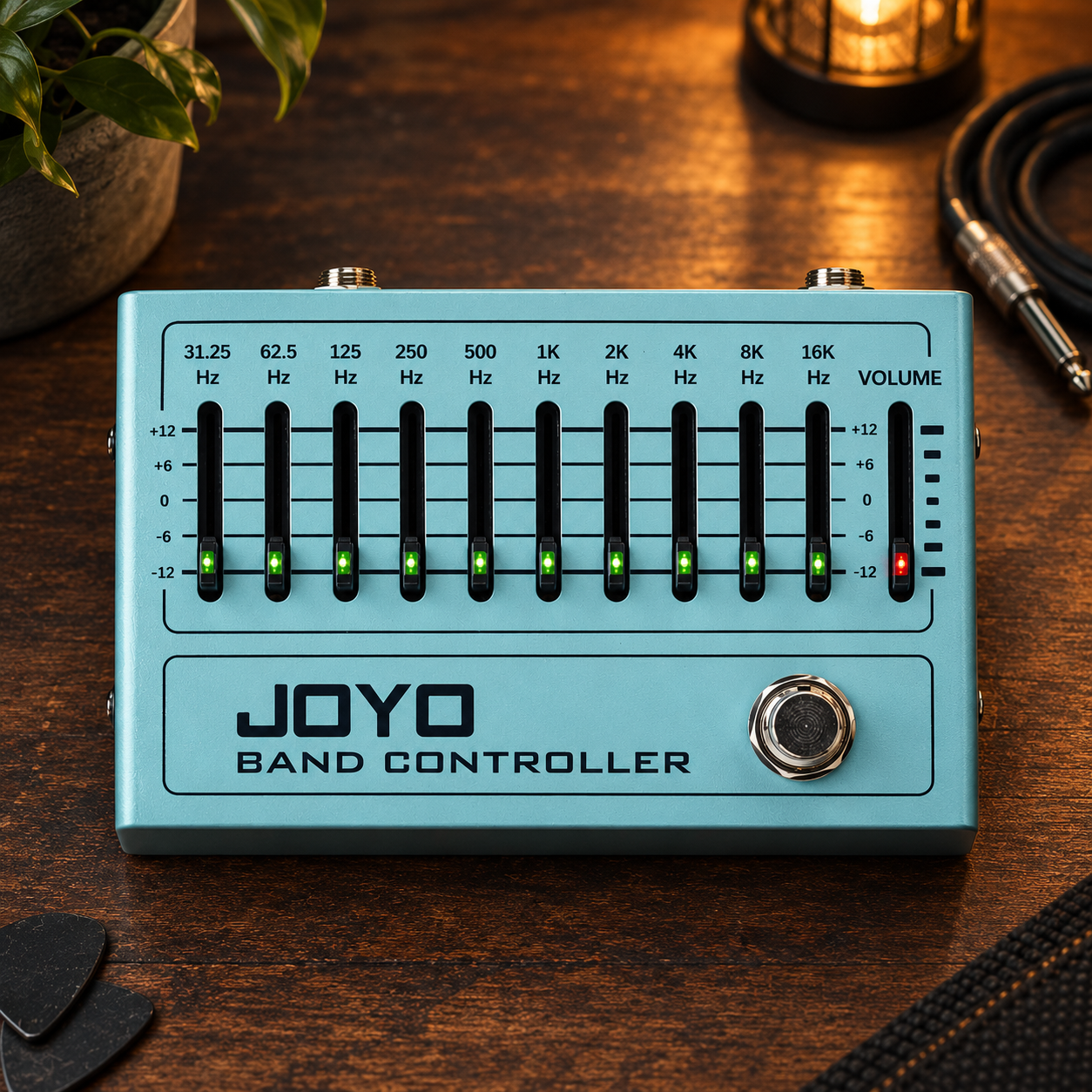
A practical guide to shaping your bass tone, cutting through the mix, and understanding what EQ with the Joyo R-12 Disclaimer: This pedal was kindly provided by Joyo for the purpose of this review. However, this does not influence our opinions or the content of our reviews. We strive to provide honest, unbiased, and accurate assessments to ensure that our readers receive truthful and helpful information. I’ve always considered EQ pedals among the most useful pieces of equipment a bass player can own, although they’re also among the least understood. Most of us can pick up a distortion pedal and work out fairly quickly how it affects our sound, even if we don’t know much about the electronics behind it. Equalisation is a different story. Moving a slider can make a bass sound fuller, clearer or more aggressive, but understanding why a particular adjustment works is what allows you to get consistent results rather than relying on trial and error. That’s one of the reasons I was particularly interested when Joyo sent me the R-12 Band Controller. Over the years, Joyo has become a friend of Bass Gear Reviews, partly thanks to the success of my original review of the Scylla compressor, which eventually became the most successful article on the website. That led to further collaborations, including the Avallon compressor, and now the R-12. Before discussing what this pedal can do for your sound, though, it’s worth understanding what those ten sliders actually control. The R-12 is a ten-band graphic equaliser covering frequencies from 31.25 Hz to 16 kHz, with up to 12 dB of boost or cut available on each band. Those numbers might look rather abstract at first, but once you understand how different frequency ranges contribute to the sound of a bass guitar, the layout becomes considerably more intuitive. Joyo R-12 Band Controller on Amazon → What exactly is an EQ pedal doing? An equaliser changes the balance of frequencies within an audio signal, allowing you to emphasise certain parts of the sound while reducing others. This matters because the character of a bass depends on considerably more than the low frequencies that give it its weight. Every note contains a fundamental frequency alongside a series of harmonics that contribute to its overall timbre. A low E on a standard four-string bass has a fundamental of approximately 41 Hz, while the low B on a five-string sits around 31 Hz. However, the sound of those notes extends much higher into the spectrum, with the upper harmonics contributing to the attack, articulation and character that help the bass remain audible in a mix. This is why the R-12’s range is useful even though the bass is traditionally associated with low frequencies. Its ten sliders let you shape everything from the deepest lows to the upper harmonics, giving you considerably more control than the basic bass, middle and treble knobs found on many amplifiers. Understanding the R-12’s frequency bands The ten bands are centred at 31.25 Hz, 62.5 Hz, 125 Hz, 250 Hz, 500 Hz, 1 kHz, 2 kHz, 4 kHz, 8 kHz and 16 kHz. Each slider affects a region around its centre frequency rather than one isolated point, so the results will depend on the surrounding bands, your instrument and the rest of your signal chain. You don’t need to memorise the frequency spectrum to use the pedal effectively, but knowing what each region generally contributes makes it easier to identify the adjustments worth trying. 31.25 Hz: the very bottom This is particularly relevant to five-string players because the frequency sits close to the fundamental of a low B string. Boosting it can add deep low-end weight, provided your amplifier and speakers can reproduce those frequencies effectively. Too much sub-bass, however, can consume headroom without making the instrument any clearer, so I’d approach this slider conservatively. 62.5 Hz: weight and fundamental This region contributes to the solid, powerful low end that gives a bass line its foundation. A modest boost can help a thin-sounding instrument feel fuller, but excessive energy here can quickly make the sound boomy, particularly in rooms that already emphasise low frequencies. The aim is to give the bass weight without overwhelming the rest of the mix. 125 Hz: warmth and fullness At 125 Hz, the emphasis is on warmth and body. Boosting this band can help a lean-sounding bass feel fuller, while cutting it slightly can tame an instrument that already has a thick low end. It’s also a useful frequency to experiment with when switching between basses with noticeably different tonal characteristics. 250 Hz: warmth versus muddiness The 250 Hz region contributes to body, but too much energy here can make a bass sound woolly or indistinct. If your instrument sounds huge when practising alone but disappears into a muddy mix with the full band, try reducing this area before reaching for the treble control. A small cut can often improve definition without sacrificing the low end. 500 Hz: body and definition This part of the midrange helps preserve the character of the bass in a mix. Too much can produce a boxy or congested sound, while cutting it excessively can leave the instrument feeling hollow. Adjusting 500 Hz independently is one of the advantages of a ten-band graphic EQ over the broader controls found on most amplifiers. 1 kHz: presence Around 1 kHz, the midrange becomes particularly important to the perceived presence of the bass. A small boost can help notes remain audible among guitars, keyboards and vocals without adding more low end. Too much, however, can make the instrument sound nasal or honky, so the best setting depends on the arrangement and the character you’re after. 2 kHz: articulation This band contributes to the definition of individual notes, making it useful for players who want their bass lines to cut through a dense mix. Pick players may appreciate the extra attack, while fingerstyle players can use it to bring out more articulation. Be careful with excessive boosts, though, as

Walrus Lore and Fable
News

Walrus Audio Brings the Lore and Fable Back in Stereo

Walrus Audio Brings the Lore and Fable Back in Stereo With MKII Updates Walrus Audio has announced the return of its Storybook Series with the new Lore MKII and Fable MKII, updated versions of two of the company’s experimental effects pedals. Both models now feature stereo operation, expanded control options and MIDI connectivity, giving players more flexibility when building ambient textures and complex soundscapes. The original Lore and Fable developed distinct identities within the Walrus Audio lineup. The Lore focused on reverse delay, reverb and pitch-shifting effects, while the Fable explored granular processing. The MKII versions retain these core concepts while introducing a range of features designed to expand their creative possibilities. Walrus Audio Lore MKII The Lore MKII is a stereo reverse soundscape generator built around five modes combining reverse reverb, delay and pitch shifting. Its different algorithms can produce reversed swells, layered textures, pitch-shifted delays and evolving ambient sounds. Complex feedback paths allow sounds to develop and change over time, moving beyond conventional delay repeats. The addition of stereo operation also opens up new possibilities for creating wider, more immersive textures in both studio and live setups. Walrus Audio Fable MKII The Fable MKII takes a different approach as a stereo granular soundscape generator. Its five modes combine delay with granular processing, manipulating short audio fragments to create evolving textures, pitch-shifted patterns and more unpredictable effects. Like the Lore, the Fable uses complex feedback paths to build sounds that can move from subtle ambience to dense, experimental layers. Its expanded stereo capabilities make it particularly interesting for players looking to add depth and movement to their effects chains. Expanded Controls and Connectivity Both pedals share a redesigned control system featuring a multifunction Tweak control, which provides access to parameters including stereo width, modulation rate and shape, pitch shifting, and the Ramp function. The Dive/Rise momentary function allows players to manipulate the clock rate in real time, adding another dimension to the sound design possibilities. Both models also include MIDI control, expression pedal and external tap functionality, three onboard presets plus Live mode, and support for up to 127 additional presets through MIDI. At the heart of each pedal is Walrus Audio’s proprietary MDSP platform, developed in-house to handle the complex algorithms, feedback paths and modulation that define the Storybook Series. Pricing and Availability The Walrus Audio Lore MKII and Fable MKII are available now. Both pedals come in two finishes: illustrated enclosures featuring artwork by Niall Grant and a Minimal Black version with simplified graphics. For players interested in experimental delay, reverse effects and granular sound design, the MKII updates bring two distinctive pedals into stereo while expanding their control and integration options. More information is available at the official Walrus Audio website.

Zoom Neurig
News

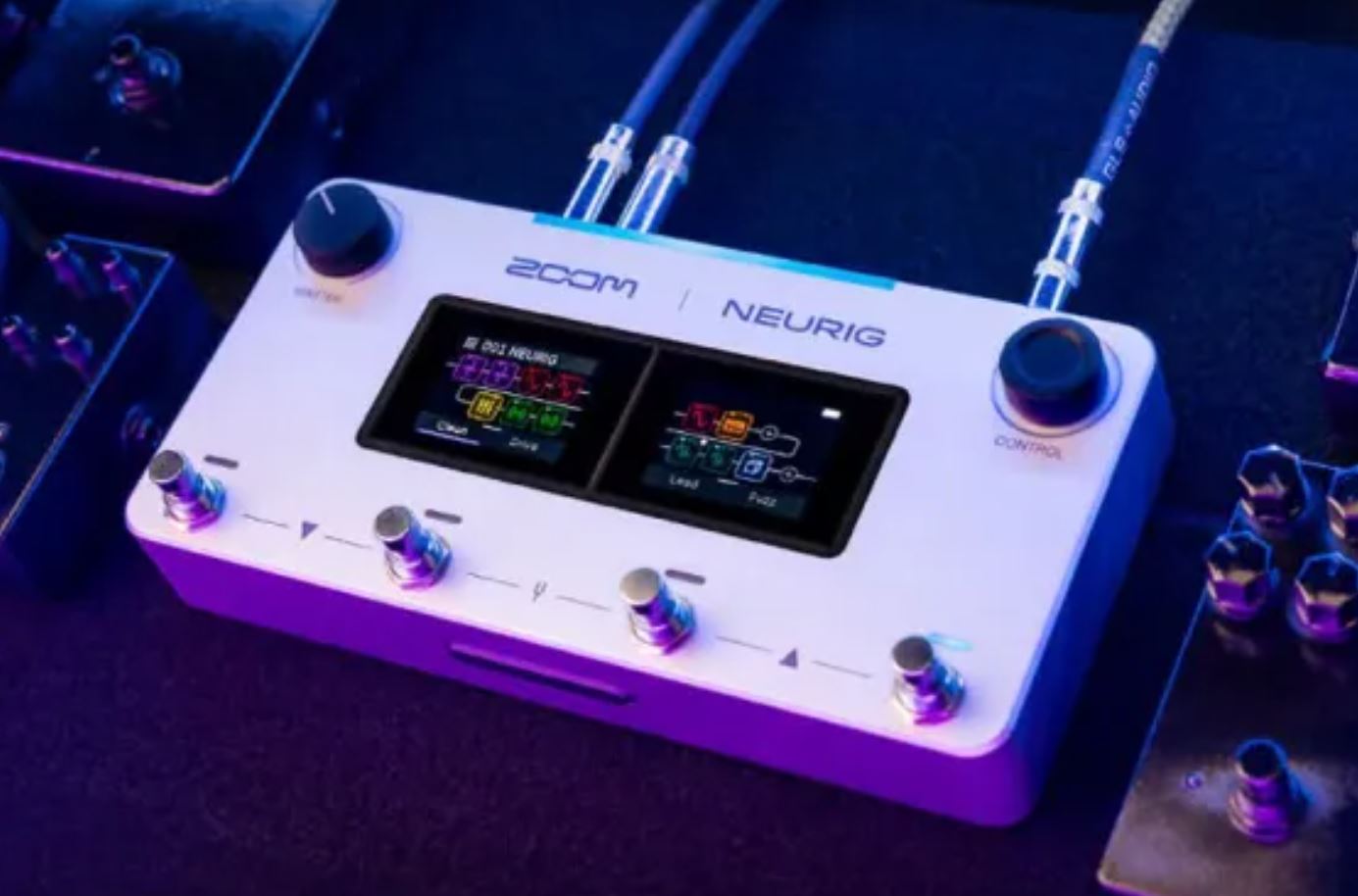
ZOOM Announces NEURIG

Zoom Announces a New Neural Modelling Pedal With NAM Support and AI Features ZOOM has announced the NEURIG, a new amp and effects modeller built around its DNA Engine neural modelling technology. The unit combines amp modelling, effects, cabinet impulse responses and native NAM A2 Lite support in a compact floor unit, with a range of features aimed at making tone creation and rig management more accessible. At the heart of the NEURIG is ZOOM’s new DNA Engine, designed to reproduce the behaviour of an amplifier rather than capturing its sound at a single setting. This means that changes to gain and EQ, as well as variations in playing dynamics, are intended to respond more like the original equipment. The unit includes 30 DNA models covering amplifiers, amp heads and drive pedals, alongside 139 effects, 22 cabinet IRs and 22 additional amp models. The NEURIG also features two touchscreens, a rechargeable lithium-ion battery and the RIG system, which allows users to combine amps and effects into complete setups and switch between them using the footswitches. Up to 200 rigs can be stored, with 75 presets included from the factory. Another major part of the package is SessionZ Pedal, ZOOM’s accompanying cloud service and app. Its planned features include AI-assisted tone creation using text prompts, the ability to play along with YouTube tracks, and AI stem separation for isolating individual parts. Further features, including capturing the sound of physical amplifiers and drive pedals, are planned for future releases. For bass players, the NEURIG is an interesting release to keep an eye on. Although ZOOM positions it as a guitar amp and effects modeller, its NAM support, effects library and flexible rig-building capabilities could make it worth exploring for bass applications. How well it handles bass-specific needs, particularly low-frequency response and the character of bass amplification, will ultimately depend on how it performs in practice. The ZOOM NEURIG is scheduled to arrive in early November 2026. More information is available on the official ZOOM website.

Joyo Avallon
Reviews

Joyo Avallon Compressor: Pedal Review

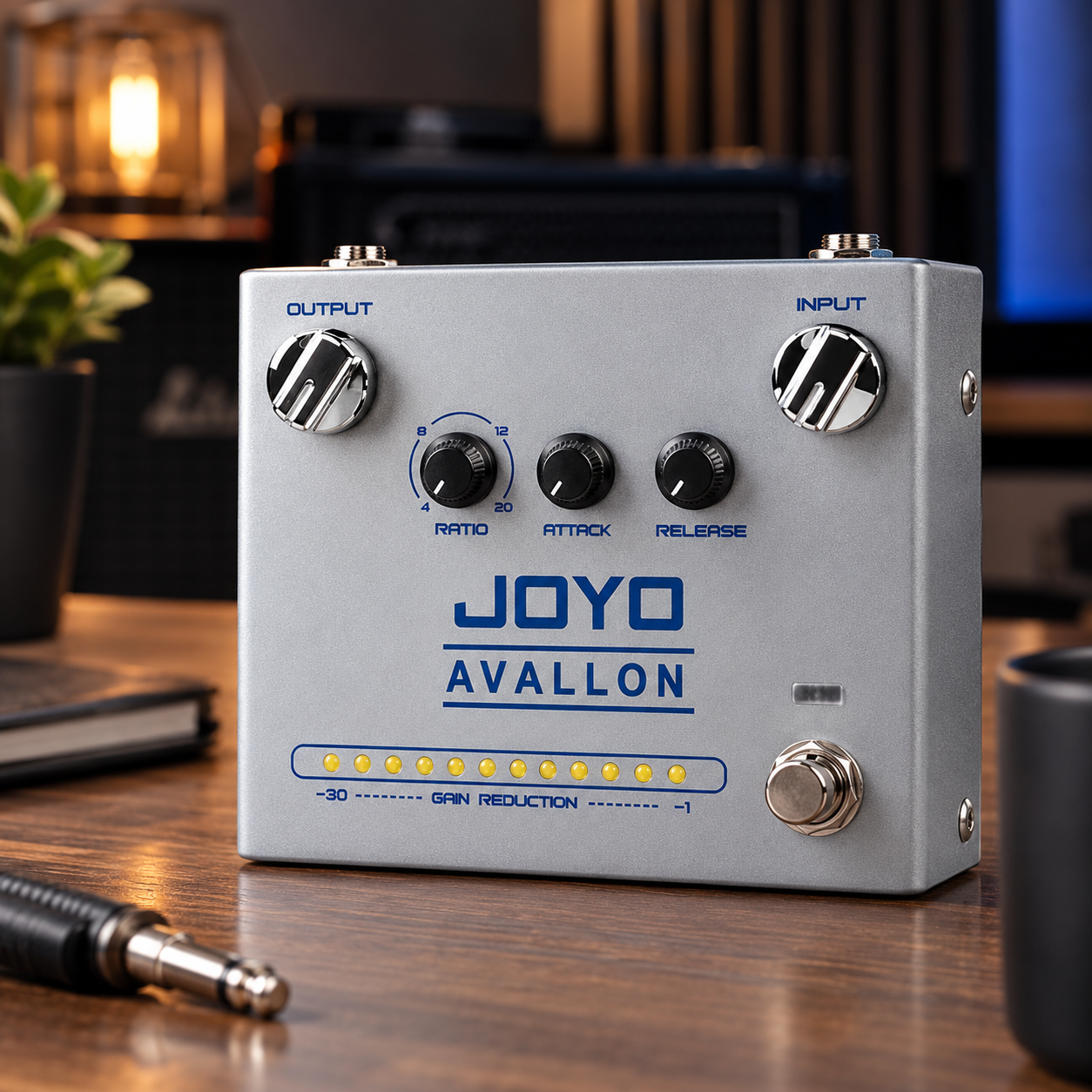
A surprisingly capable compressor for bass When I reviewed the Joyo Scylla compressor back in 2024, I had no idea that the pedal would eventually become such an important part of Bass Gear Reviews. What started as a review of a relatively inexpensive compressor turned into the most visited and best-converting article on the entire website, and it has remained there ever since. So when Joyo got in touch and offered to send me their other compressor, the Avallon, it seemed like a particularly appropriate opportunity to revisit what the company is doing in this part of the market. Disclaimer: This pedal was kindly provided by Joyo for the purpose of this review. However, this does not influence our opinions or the content of our reviews. We strive to provide honest, unbiased, and accurate assessments to ensure that our readers receive truthful and helpful information. The Avallon is a very different pedal from the Scylla, though, and that’s worth making clear from the beginning. This isn’t a comparison between the two, and I don’t think it makes much sense to approach it as one. The Avallon has its own design, its own way of approaching compression and, most importantly, its own audience. Where the Scylla puts quite a lot of emphasis on being a flexible bass compressor with a tone control, the Avallon takes a more traditional compressor approach. You get Input, Output, Ratio, Attack and Release, together with a gain-reduction meter that gives you something the Scylla doesn’t: a visual indication of what the compressor is actually doing. That immediately makes the Avallon an interesting proposition for bass players, particularly those who want to understand their compressor rather than simply switch one on and leave it there. A different approach to compression The Avallon is part of Joyo’s R Series, and it is physically larger than many of the company’s compact pedals. The extra space isn’t being used for decoration. Most of the enclosure is taken up by the controls and the row of LEDs that make up the gain-reduction meter. It’s a fairly straightforward layout. Input and Output sit at the top, with Ratio, Attack and Release underneath. There is no dedicated threshold control, so the Input knob is an important part of how you set the amount of compression. Increase the input signal and you’re driving the compressor harder; reduce it and you’re backing away from the point where compression starts to become noticeable. That takes a little getting used to if you’re accustomed to compressors with a separate threshold control, but it makes sense once you start using the pedal. The Output control then gives you a way of bringing the overall level back into line after you’ve established how hard you want to drive the compressor. Ratio determines how much compression is applied once the signal crosses the threshold, while Attack and Release control how quickly the compressor responds and recovers. In practice, those four controls give you quite a lot of room to move between subtle dynamic control and much more obvious compression. That’s really the essence of the Avallon. It isn’t trying to disguise the fact that you’re using a compressor. It gives you the controls and lets you decide how much of it you want to hear. The gain-reduction meter is genuinely useful The feature that immediately separates the Avallon from a lot of inexpensive compressors is the gain-reduction meter. Compression can be surprisingly difficult to set by ear, especially when you’re starting out. It’s very easy to turn on a compressor, hear the resulting signal get louder or more controlled and assume that you’ve improved the sound when you’ve actually just changed the volume. Having some visual feedback makes that process considerably easier. The LEDs show the amount of gain reduction being applied as you play, so you can see when the compressor starts working and how much it is reacting to your playing. That is particularly useful when you’re adjusting Attack and Release because you can actually watch the compressor respond while listening to what those changes are doing to the bass. It’s also useful for an experienced player. With bass, particularly a five-string, there can be a substantial difference in the amount of energy produced by different notes. A low B played aggressively can behave very differently from a higher note played softly, and watching the meter while playing can give you a much better idea of how consistently the compressor is responding. Attack and Release matter more than you might think Attack and Release are the controls that will probably have the biggest effect on how natural or obvious the Avallon feels. A fast attack catches the initial transient of the note quickly. That’s useful when the objective is to control peaks and make the overall performance more even, but too much compression too early can also take some of the character out of your playing. A slower attack allows more of that initial note through before the compressor starts reducing the level. On bass, that can preserve some of the punch and articulation that makes the instrument work in a mix. Release works in the other direction, determining how quickly the compressor stops working after the signal falls back down. A fast release can make the compressor feel more active and responsive, while a slower release produces a smoother and more sustained effect. There isn’t really a correct setting here. It depends on what you’re playing and what you’re trying to achieve. That’s one of the reasons I like the Avallon’s approach. There is enough control to make those decisions yourself rather than having the pedal make all of them for you. Using the Avallon with bass A compressor can help even out fingerstyle playing, control the peaks of slap, give notes more consistency and add sustain without necessarily sounding like you’ve put an obvious effect on the instrument. The Avallon is well suited to that kind of use because you can start with a relatively conservative