Blog

Category: Reviews

Axe I/O One
Reviews

IK Multimedia Axe I/O One: Interface Review

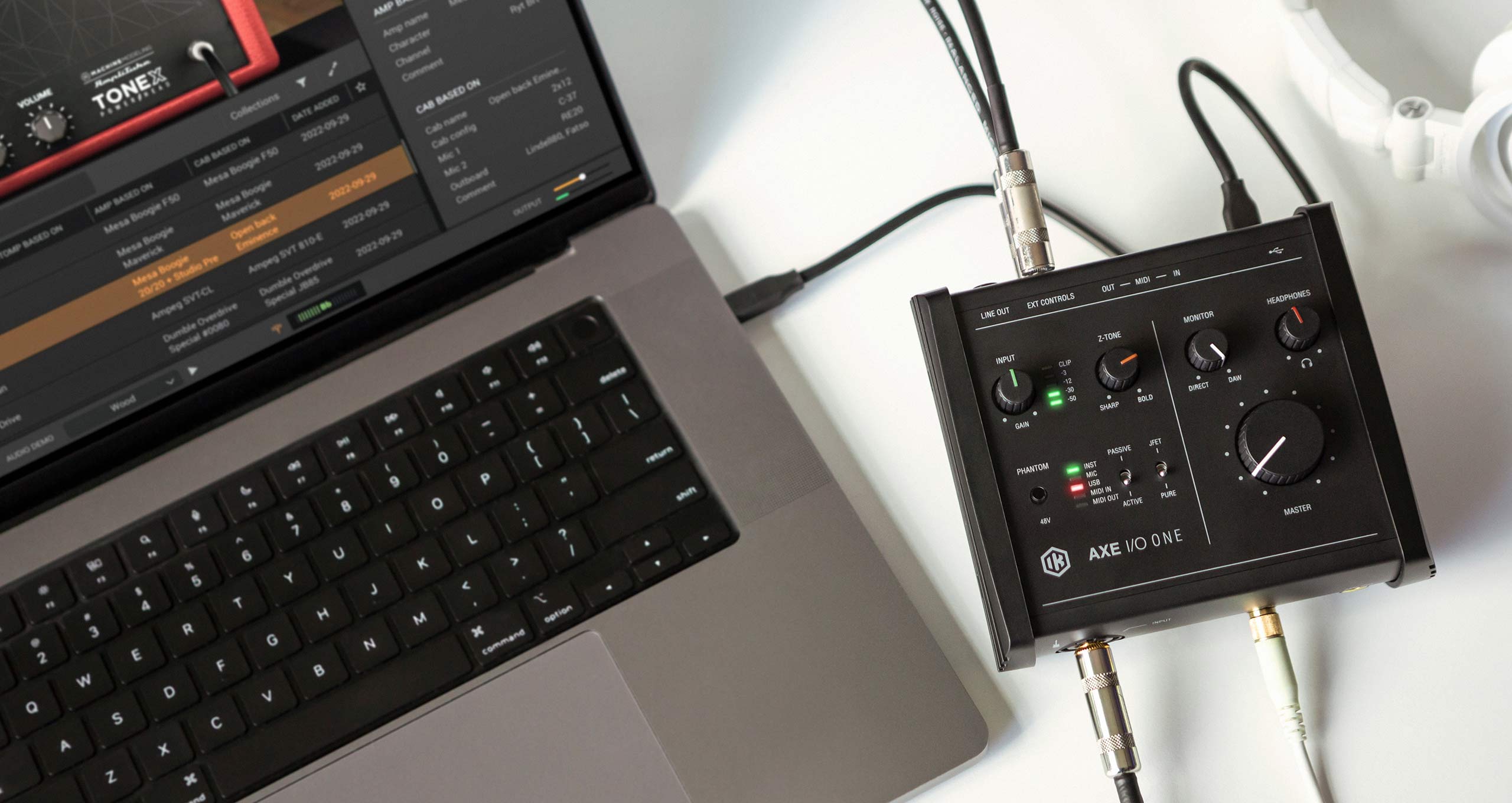
Disclaimer: This unit was kindly provided by IK Multimedia for the purpose of this review. However, this does not influence our opinions or the content of our reviews. We strive to provide honest, unbiased, and accurate assessments to ensure that our readers receive truthful and helpful information. A Smart/Small Interface for Bass Players In a market full of nearly identical budget audio interfaces, the IK Multimedia Axe I/O One manages to stand out—especially if you’re a bass player. While it may look like just another compact USB interface, it offers tone-shaping tools, reamping capabilities, and thoughtful design choices that make it far more than meets the eye. Whether you’re tracking demos at home, building a portable setup, or looking for a flexible DI solution, the Axe I/O One is well worth your attention. Effortless SetupGetting up and running with the Axe I/O One is refreshingly simple. After registering the unit on IK Multimedia’s website and downloading their control software (which includes all necessary drivers), it was a matter of plugging it in via USB. The interface was immediately recognized by my DAW (Reaper), and I was recording bass within minutes. From firmware updates to input detection, everything worked smoothly—no troubleshooting or digging through menus. That kind of reliability is especially welcome when inspiration strikes and you just want to hit record. Designed for Instrument PlayersAlthough it’s marketed as a guitar-focused interface, many of the Axe I/O One’s standout features translate beautifully to bass. This is not just a standard 1-in/3-out audio box—it’s a tool for shaping and refining your tone before it even hits your plugins or amp sims. Designed for Instrument Players Although it’s marketed as a guitar-focused interface, many of the Axe I/O One’s standout features translate beautifully to bass. This is not just a standard 1-in/3-out audio box—it’s a tool for shaping and refining your tone before it even hits your plugins or amp sims. Key Features: At this price point, features like Z-Tone and Amp Out are rare—and particularly useful for bass players looking to get the most out of their instrument tone. Z-Tone: Impedance Control with Real Impact One of the most unique features of the Axe I/O One is the Z-Tone knob, which lets you control the input impedance of the instrument channel. This may seem like a minor technical detail, but in practice, it allows you to meaningfully shape the tonal character of your bass. Higher impedance settings (labeled “Sharp”) give your signal a brighter, more articulate tone—ideal for active basses or modern fingerstyle work. Lower settings (“Bold”) round off the top end and emphasize the lows, perfect for vintage-style passive basses or thick, supportive lines. The Z-Tone circuit reacts differently depending on your bass and pickups, offering a subtle but highly musical way to tailor your tone—before you even touch an EQ or amp model. “Z-Tone allows change to impedance from tighter/sharper tone to a thicker/bolder tone all in the same instrument.” JFET vs PURE Input Stages Another standout feature is the ability to switch between two input stages: The tonal difference is not drastic, but it’s enough to influence the feel of your playing and the character of your recorded tone. Especially when paired with Z-Tone and pickup type switching, it makes the interface far more versatile than it first appears. Amp Out & Reamping: Pro-Level Flexibility The Amp Out jack is a feature rarely seen in interfaces at this price level. It allows you to take a clean DI signal you’ve recorded and send it out to a real amp, pedal chain, or reamping box for further tone processing—without latency or level mismatches. What is Reamping? Reamping is the process of recording a clean, direct signal from your instrument, and later sending that signal through amplifiers or pedals to experiment with tone. It’s commonly used in professional studios, allowing engineers to refine or completely change a sound after the performance has been captured. For bassists, this opens up the ability to: This makes the Axe I/O One an excellent choice not only for home setups, but also for players working with studios or engineers who want more tonal control. What’s Missing? No device is perfect, and the Axe I/O One does come with a couple of limitations: Software Included The bundled software adds real value, especially for bass players who might be building their first recording rig: This makes the Axe I/O One a great all-in-one starter package for recording bass without needing to buy extra software or plugins. Final Thoughts: A Smart Buy for Bass Players The IK Multimedia Axe I/O One is more than just a budget interface—it’s a well-designed tool for tone-conscious players who want flexibility without complexity. With features like Z-Tone, PURE/JFET switching, and built-in reamping, it empowers bassists to capture professional-quality tones and adapt them to a wide range of musical contexts. It’s compact, easy to use, and includes everything you need to start recording and shaping your sound. Whether you’re just getting into home recording or need a travel-friendly interface with serious tone tools, the Axe I/O One delivers excellent value. ConclusionThe Axe I/O One is a smart, musician-focused interface that offers meaningful benefits to bass players, especially those working in home studios or mobile environments. If you’re looking for a compact DI solution that does more than just capture a clean signal, this one deserves a serious look.
Broughton Low Pass Filter
Reviews

Broughton Audio Low Pass Filter: Pedal Review

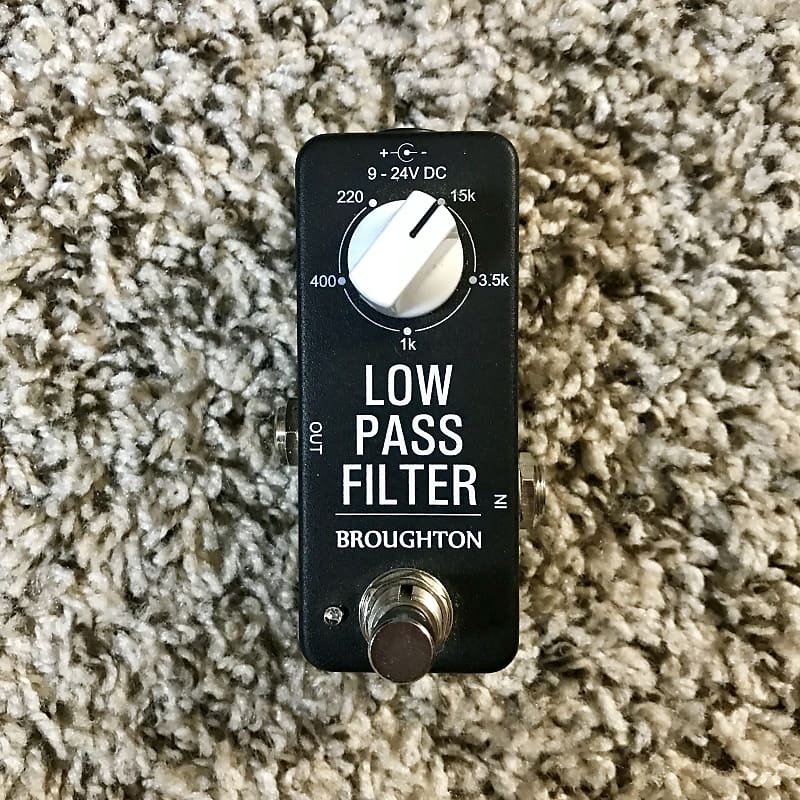
Sculpting the Perfect Bass Tone ​The Broughton Audio Low Pass Filter is a compact, purpose-built pedal designed to give bass players precise control over their high-frequency content. Whether you’re aiming to tame fret buzz, smooth out distortion artifacts, or sculpt a deep dub tone, this pedal offers a straightforward yet powerful solution. Key Features Why Low Pass Filtering Matters for Bass Players Low pass filters (LPFs) are essential tools in both live and studio settings. For bass players, LPFs help in:​ Historically, LPFs have been integral in audio engineering, used to manage frequency content and prevent overlap in mixes. In the context of bass guitar, they allow players to maintain clarity and focus in their low-end frequencies.​ User Feedback Bass players who have incorporated the Broughton Low Pass Filter into their rigs often describe it as an “always-on” pedal. Users report a significant improvement in tone clarity and a reduction in unwanted high-frequency content. The pedal’s simplicity and effectiveness make it a favorite among those looking to refine their sound without adding complexity to their setup.​ Final Thoughts The Broughton Audio Low Pass Filter stands out as a specialized tool that addresses specific tonal challenges faced by bass players. Its straightforward design, combined with its effectiveness, makes it a valuable addition to any pedalboard. Whether you’re performing live, recording in the studio, or practicing at home, this pedal offers a reliable solution for managing high-frequency content and achieving a polished bass tone. This was a new type of review, more casual and relaxed, let me know what you thought of it. Want more content like this here on the page?

Empress Bass Compressor
Reviews

Empress Bass Compressor: Pedal Review

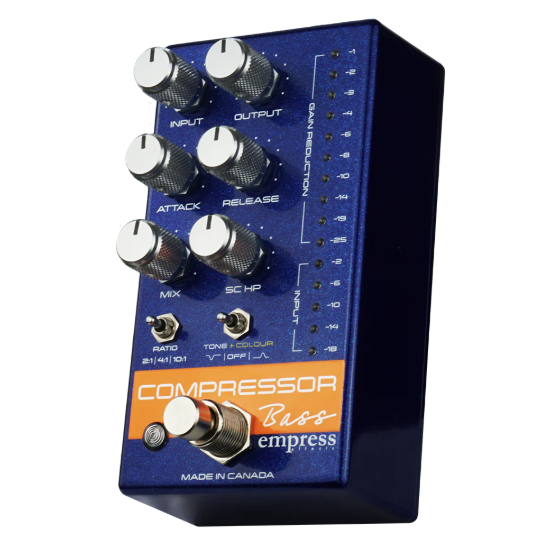
A Compressor That Demands — and Rewards — Your Attention Lately, we’ve been diving deep into the world of bass compression. We’ve explored vintage options like the Boss CS-2, modern heavy-hitters like the Origin Cali76, and even budget picks such as the TC Electronic SpectraComp. But when it comes to modern, studio-grade options in a pedal format, there are only a few standout choices that consistently show up in serious discussions. The Origin Cali76, the Diamond Compressor, and today’s focus: the Empress Bass Compressor. Disclaimer: This pedal was kindly provided by Empress Effects for the purpose of this review. However, this does not influence our opinions or the content of our reviews. We strive to provide honest, unbiased, and accurate assessments to ensure that our readers receive truthful and helpful information. Overview The Empress Bass Compressor is specifically voiced for bass, with a frequency response of 10Hz–20kHz. It features an all-analog signal path, true bypass switching, and detailed multi-segment metering for both input and gain reduction. With a mix knob for parallel compression, an external sidechain input, and a variable high-pass filter, this pedal is easily one of the most feature-rich compressors on the market. Out of the box, it delivers a studio-level feature set, packed into a compact pedal chassis. While many pedal compressors simplify their layout to appeal to casual users, the Empress goes the opposite route: full metering, independent attack and release controls, mix knob, sidechain capabilities, ratio control, and even a two-position Tone + Colour switch that adds subtle tone shaping and harmonic coloration. For those unfamiliar with compression, the included manual does a fantastic job. It covers basic compression theory and offers sample settings to help get you started. This is a big win considering the pedal’s complexity. Let’s take a look at the features one by one. Key Features Explained Input and Gain Reduction Metering Many pedal compressors either skip metering altogether or offer a minimal version. Not the Empress. This pedal provides full metering for both input signal and gain reduction — a huge asset for both live and studio use. Input Control Sets the input level going into the compression circuit. Higher input levels = more compression. Output Control Sets the post-compression output level. This helps balance volume loss from compression, or can be used as a clean boost (fun fact: Empress officially supports bass solos — and so do we at BassGearReviews.com). Attack Controls how quickly the compressor reacts once the signal exceeds the threshold. Release Controls how quickly the compressor stops compressing after the signal drops below the threshold. Mix (Parallel Compression) Blends the dry (uncompressed) and wet (compressed) signals. This is essential for maintaining natural dynamics while gaining sustain — a hallmark of parallel compression. Sidechain High-Pass Filter Filters out low frequencies from the sidechain signal (from 20Hz to 400Hz). This lets you prevent low-end thumps from triggering compression too aggressively — great for slap, pick playing, or sidechaining. Ratio Determines how aggressively the compressor clamps down on peaks. The Empress offers: Tone + Colour Control This flexibility makes the pedal appealing to both camps: those chasing transparency and those looking for a bit of character in their tone. Bypass Switch Standard footswitch for true bypass on/off. Understanding Sidechain Compression Sidechain compression uses an external signal to trigger compression on your main signal (your bass). For example, if you run a kick drum into the sidechain, the bass will duck slightly each time the kick hits — useful for mixing clarity. The Empress includes a 1/8″ sidechain input for this purpose. The incoming sidechain signal doesn’t pass through the pedal’s output — it’s purely used to trigger compression. If no sidechain is connected, the high-pass filter affects how your bass signal triggers the compression. Performance and Use The Empress Bass Compressor is extremely versatile. Whether you’re looking for smooth and transparent compression, dynamic control for fingerstyle, punch for slap, or even brick-wall limiting, this pedal handles it all. However, this is not a plug-and-play pedal. It demands some understanding — or at least curiosity — to get the most out of it. Thankfully, the included manual provides an excellent starting point. Pros Studio-Grade Features in a Pedal FormatUnparalleled control in a stompbox: input/output level, metering, attack/release, parallel compression, sidechain HPF — rare even in rack units. Transparent and Musical CompressionThe 2:1 and 4:1 settings offer clean, musical compression that retains dynamics and preserves your playing style. Tone Shaping FlexibilityWith optional mid scoop/boost and harmonic distortion, the Tone + Colour switch adds useful character without locking you into one sound. Full LED MeteringVisual feedback for both input and gain reduction makes setting levels precise and intuitive. Parallel CompressionBlend dry and compressed signals for a more musical, natural result — especially useful for bass. Sidechain High-Pass FilterProfessional-level sidechain control in a pedal. Great for slap, pick, and studio sidechain mixing. Clear, Helpful ManualDespite the complexity, Empress makes learning accessible with clear diagrams and starter settings. True Bypass + Analog PathKeeps your tone untouched when bypassed, free of digital artifacts. Cons Steep Learning CurveNot ideal for compression beginners or those who want to “set it and forget it.” Limited Ratio OptionsOnly 3 ratio settings. While well-chosen, some might want more granularity (e.g., 6:1 or 8:1). Premium Price PointYou get what you pay for, but this might be out of reach for more casual players. 1/8” Sidechain InputInconvenient for some setups — may require adapters or custom cables. Conclusion: A Compressor That Demands — and Rewards — Your Attention The Empress Bass Compressor isn’t just another pedal — it’s a studio-grade tool packed into a rugged stompbox. It’s easily one of the most powerful and transparent compressors available to bassists, offering detailed control over every aspect of your dynamic range. What sets it apart is its complexity — and that’s intentional. Empress built this for players who want control. If you’re the kind of bassist who likes to tweak, shape, and perfect your tone, this pedal will deliver in spades. But make no

Helix Obsidian distortion
Reviews

Helix Obsidian 7000 Dist: Pedal Review

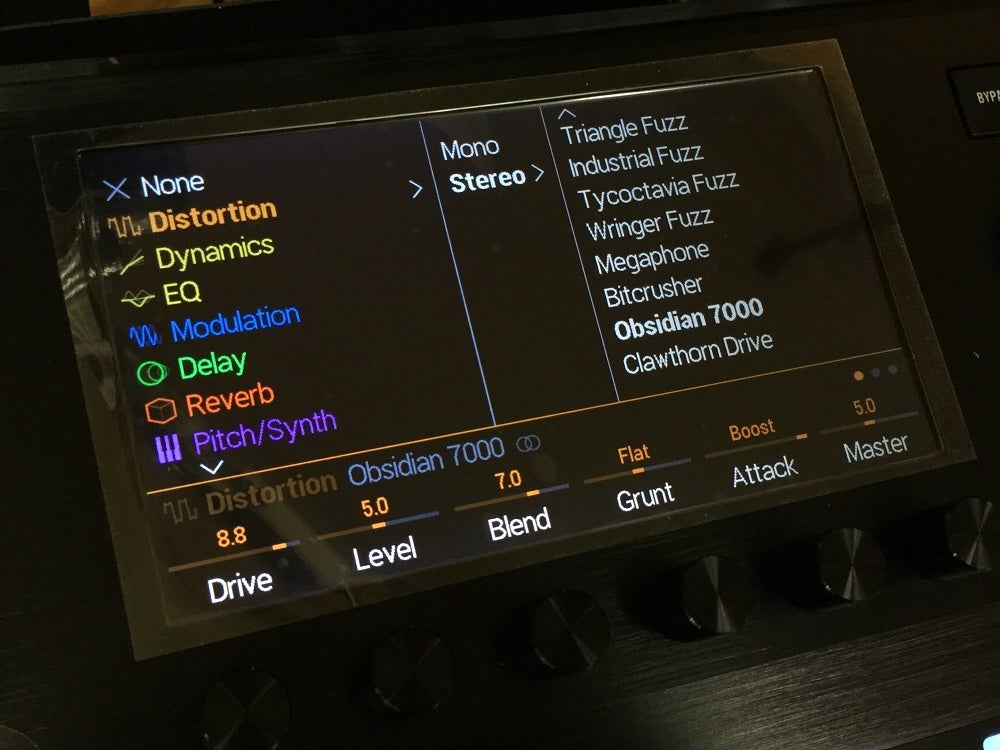
The Helix Take on Darkglass For modern bass players, few distortion pedals have made as much impact as the Darkglass Microtubes B7K Ultra. Known for its aggressive yet articulate tone, it has become a go-to choice for players seeking clarity, punch, and saturation without sacrificing low-end presence. In the world of amp modeling and digital effects, Line 6 has taken a swing at this classic with the Obsidian 7000 Dist in the Helix ecosystem. But how well does it hold up? And is it a worthy alternative to the real thing? Let’s dive in. The Darkglass Legacy and the Obsidian Interpretation The Darkglass B7K Ultra is a staple for bass players looking for a modern, high-gain drive with a powerful EQ section. It excels at cutting through dense mixes, thanks to its combination of drive, blend, and a 4-band EQ with selectable mids. The B7K Ultra also features attack and grunt switches, allowing for more control over harmonic content and low-end response. The Obsidian 7000 Dist in the Helix is Line 6’s digital interpretation of this beloved pedal. It mimics the B7K Ultra’s core tonal characteristics, offering similar EQ flexibility, blend control, and gain structure. However, being part of the Helix ecosystem means it also benefits from digital convenience, routing flexibility, and total recall—something a standalone analog pedal can’t quite match. How Close Is the Tone? Sonically, the Obsidian 7000 Dist does an impressive job capturing the spirit of the B7K Ultra. The drive characteristics are sharp and articulate, allowing notes to remain defined even under heavy distortion. The blend control is just as essential here as in the original, letting you mix in the clean signal to preserve low-end punch. The EQ section offers a similarly sculpted response, with the selectable mids doing a great job of tailoring the attack and presence. Where the differences start to show is in the feel and responsiveness. The analog circuitry of the B7K Ultra gives it a certain warmth and organic response that digital modeling—while close—doesn’t completely replicate. Some players might find the Helix version slightly more compressed, though in a mix, this is hardly noticeable. Usability and Practical Benefits What the Obsidian 7000 Dist lacks in analog “mojo,” it makes up for in versatility and integration. Since it’s part of the Helix, you can: For touring or session musicians, this level of convenience and recall can outweigh the tonal nuances of the analog counterpart. Final Verdict: Worth Using? If you’re a bass player looking for the B7K Ultra sound within the Helix, the Obsidian 7000 Dist is absolutely worth using. It delivers a convincing modern distortion tone, captures the essence of the Darkglass circuit, and provides Helix-exclusive flexibility that the standalone pedal can’t offer. However, if you’re a purist who values the feel and slight harmonic differences of analog gear, the real B7K Ultra may still be your best bet. That said, for live use, recording, and ease of integration, the Obsidian 7000 Dist is a fantastic tool that proves once again why Helix remains one of the best multi-effects platforms for bassists.

TC Electronic SpectraComp
Reviews

TC Electronic SpectraComp: Pedal Review

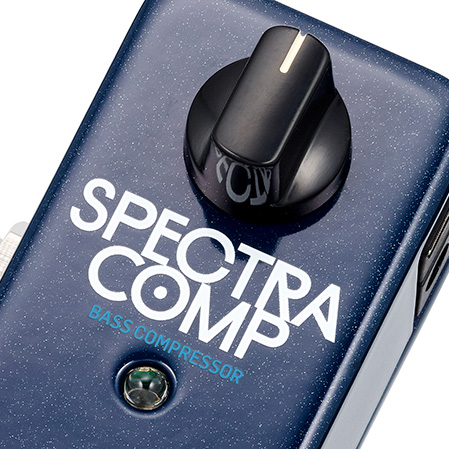
Where Simplicity Meets Compression The TC Electronic SpectraComp is a compact, digital multiband compressor designed specifically for bass players. Unlike traditional single-band compressors, it applies compression independently to different frequency ranges, ensuring a more balanced, natural sound. Featuring a one-knob control, it is designed for simplicity, while the TonePrint feature allows for deep customization. But does it deliver? Let’s break it down. One-Knob Control – How It Works While it may seem limiting at first, the one-knob control actually adjusts multiple parameters simultaneously, including: What Happens When You Turn the Knob? Since the pedal is multiband, it compresses lows, mids, and highs separately, preventing unwanted pumping and retaining clarity. This is especially useful for bassists who want even dynamics without squashing their tone. Sound & Performance Transparent & Musical Compression: Unlike heavy-handed compressors that color your sound, SpectraComp remains natural. Enhances Consistency: Levels out dynamics while preserving attack and note articulation. Ideal for Various Playing Styles: Works well for fingerstyle, slap bass, and pick playing. No Muddy Lows or Harsh Highs: The multiband design ensures balance across all frequencies. No Gain Reduction Meter: Makes it hard to see how much compression is applied in real-time. TonePrint Customization The one-knob design is great for simplicity, but if you want more control, the TonePrint app allows you to: Pros & Cons Pros:✅ Compact & sturdy design✅ Multiband compression for a natural, balanced tone✅ Simple one-knob operation✅ TonePrint customization for advanced users✅ Transparent sound that retains dynamics Cons:❌ No onboard controls for detailed tweaking❌ No visual gain reduction meter❌ Digital sound may not appeal to analog purists Conclusion The TC Electronic SpectraComp is one of the best compact bass compressors available today. The one-knob design makes it effortless to use, while the TonePrint feature provides deep editing for those who want more control. Its multiband compression ensures an even, natural sound, making it an excellent choice for bass players of all styles. However, if you prefer onboard controls and visual feedback, an analog compressor might be a better fit. Best for: Bass players who want an easy, high-quality compressor with minimal fuss and maximum flexibility