Blog

Category: Reviews

Reviews

Swiff Audio WT09a Wireless System Review

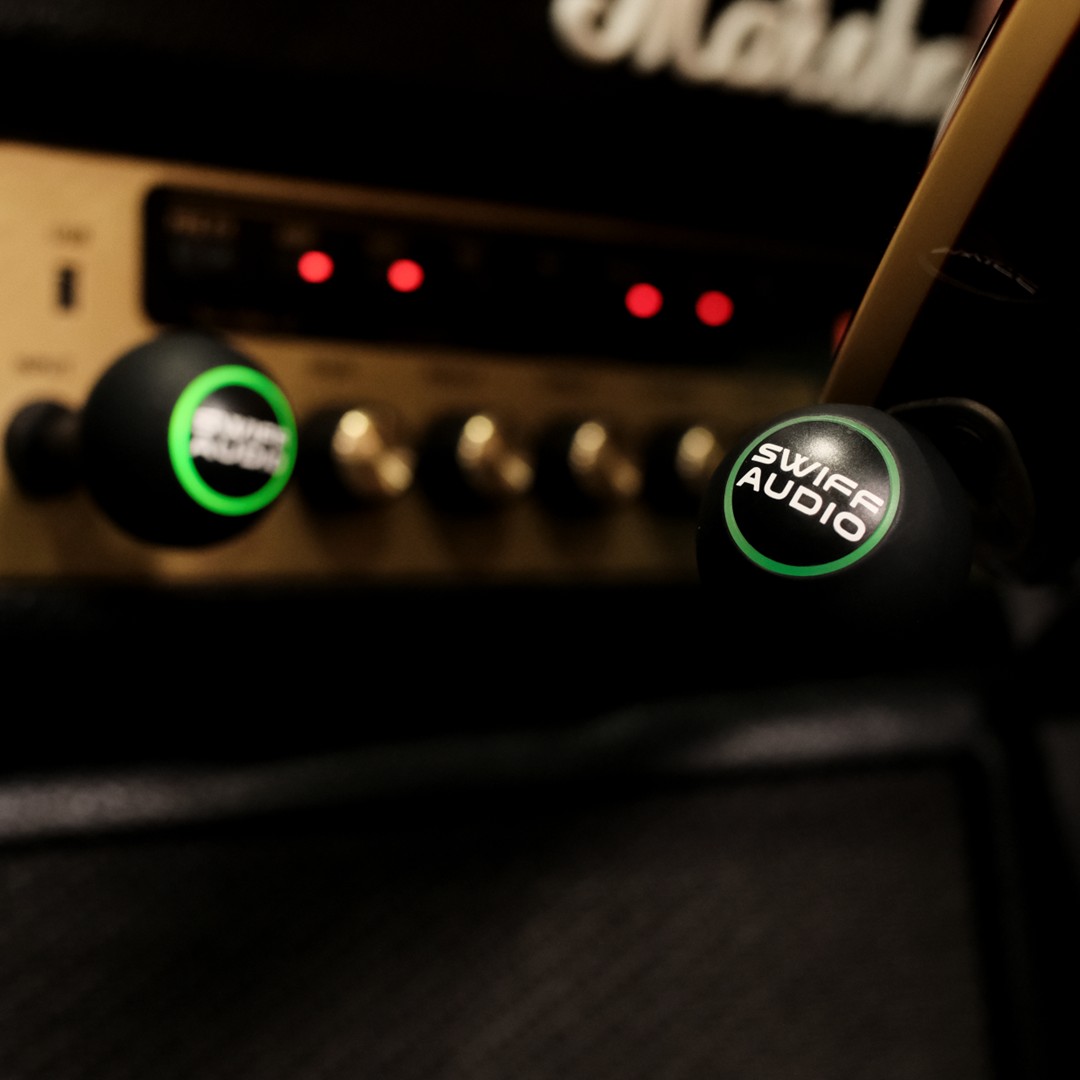
A review dedicated to Bass Players Disclaimer: This wireless equipment was kindly provided by Swiff Audio for the purpose of this review. However, this does not influence our opinions or the content of our reviews. We strive to provide honest, unbiased, and accurate assessments to ensure that our readers receive truthful and helpful information. For a long time, wireless systems and bass players didn’t really get along. Guitar players could usually tolerate the compromises — a bit of softened top end, a touch of compression, slightly rounded transients. But bass is less forgiving. The moment a system starts shaving off low-end authority or messing with attack definition, it becomes obvious immediately. Your instrument feels smaller, less responsive, and disconnected from your hands. That’s why budget wireless systems have historically been a hard sell for bass players. The Swiff Audio WT09a, however, is part of a newer generation that’s trying to change that conversation. First impressions & packaging Before you even plug it in, the WT09a already feels different from most budget wireless systems. Swiff has clearly paid attention to the user experience here. The system arrives in a solid magnetic hard case, which immediately elevates the perception of the product. It’s a small thing, but for gigging musicians it matters more than it should. Wireless systems are exactly the kind of gear that usually ends up rattling around in gig bags, tangled with patch cables, adapters, and spare strings. Having a dedicated, secure, magnetic case makes it feel like a proper piece of professional gear rather than an afterthought. The units themselves also feel well put together. There’s a simplicity to the design that works in its favour. Nothing feels overly fragile or toy-like, and the large green LED indicator is a genuinely useful touch once you’re on stage. In low-light environments, it’s immediately visible — no squinting, no guessing. You know instantly whether you’re connected and powered. That usability detail becomes more valuable the more you play live. Check the price on Amazon –> Why bass players are harder to convince Bass is one of the most revealing instruments when it comes to signal chain compromises. Most of the instrument’s fundamental energy sits in the low-frequency range — roughly from 40 Hz upward on a standard four-string, and even lower on five-strings. But the character of the sound isn’t just in the lows. The definition lives much higher, in the upper mids and transient range. That balance is what makes wireless systems tricky. If a system struggles, it usually shows up in one of three ways: And bass players notice all three immediately. Frequency response and tone On paper, the WT09a covers the full 20 Hz–20 kHz range, and in practice it does a respectable job of preserving the full bandwidth of the instrument. The important part isn’t just whether the lows are technically present — it’s whether they still feel authoritative. With the WT09a, the low end remains surprisingly intact. A low E still has weight, and a low B doesn’t collapse or thin out in any obvious way. Where things get more interesting is in the midrange and upper mids. This is where bass tone actually “speaks” in a mix. The growl of fingerstyle, the bark of a pick attack, and the snap of slap technique all live in this zone. The WT09a doesn’t destroy that information, but it does slightly smooth it. The edges are a little less sharp compared to a high-quality cable. The result is a sound that is very slightly rounded, but still musical and usable. In a full band mix, that subtle smoothing can actually work in your favour. It tends to sit bass in the pocket a little more gently, without pushing harsh frequencies forward. Latency and playing feel Latency is where many budget wireless systems fall apart for bass players. Even small delays can affect groove perception, especially for players who rely heavily on physical timing and tactile response. The WT09a feels immediate. Swiff claims sub-4 ms latency, and while real-world perception is more important than spec sheets, the practical experience is that the system responds fast enough to disappear under your fingers. Fingerstyle feels locked in. Ghost notes remain tight. Slap playing retains its rhythmic punch without feeling detached from the instrument. Once you’ve played for a few minutes, you stop thinking about latency entirely — which is exactly what you want. Passive vs active basses This is where the WT09a shows a bit of character. With passive basses, the system feels at its best. Fender-style instruments, vintage pickups, and moderate-output signals all translate very naturally. The tone stays full, responsive, and predictable. Active basses are a little more variable. Hot onboard preamps or aggressive EQ boosts can push the input harder, and in some cases this introduces a slightly compressed or constrained feel. It’s not dramatic, but it is noticeable if you’re used to a very open signal path. In practical terms, passive bass players will likely have a smoother experience overall, while active bass players should test it with their specific instrument and gain settings. Real-world gig performance This is not a touring-grade wireless system, and it doesn’t pretend to be. But within its category, it performs confidently. For rehearsals, club gigs, church services, pub stages, wedding bands, and small-to-mid venue work, it holds up well. Setup is quick, connection is stable under normal conditions, and the compact form factor makes it easy to integrate into a pedalboard-based rig. Like all 2.4 GHz systems, it can still be affected by crowded wireless environments, but that’s a limitation of the format itself rather than something unique to this unit. Battery life is solid enough for typical gigs, though not exceptional for extended multi-set situations. The bigger picture: why this matters for bass players What’s interesting about the WT09a isn’t that it revolutionises wireless technology. It doesn’t. What it represents is something more practical — the point where affordable wireless systems finally become usable for bass without feeling like
Reviews

Jad Freer LUCE DI Review

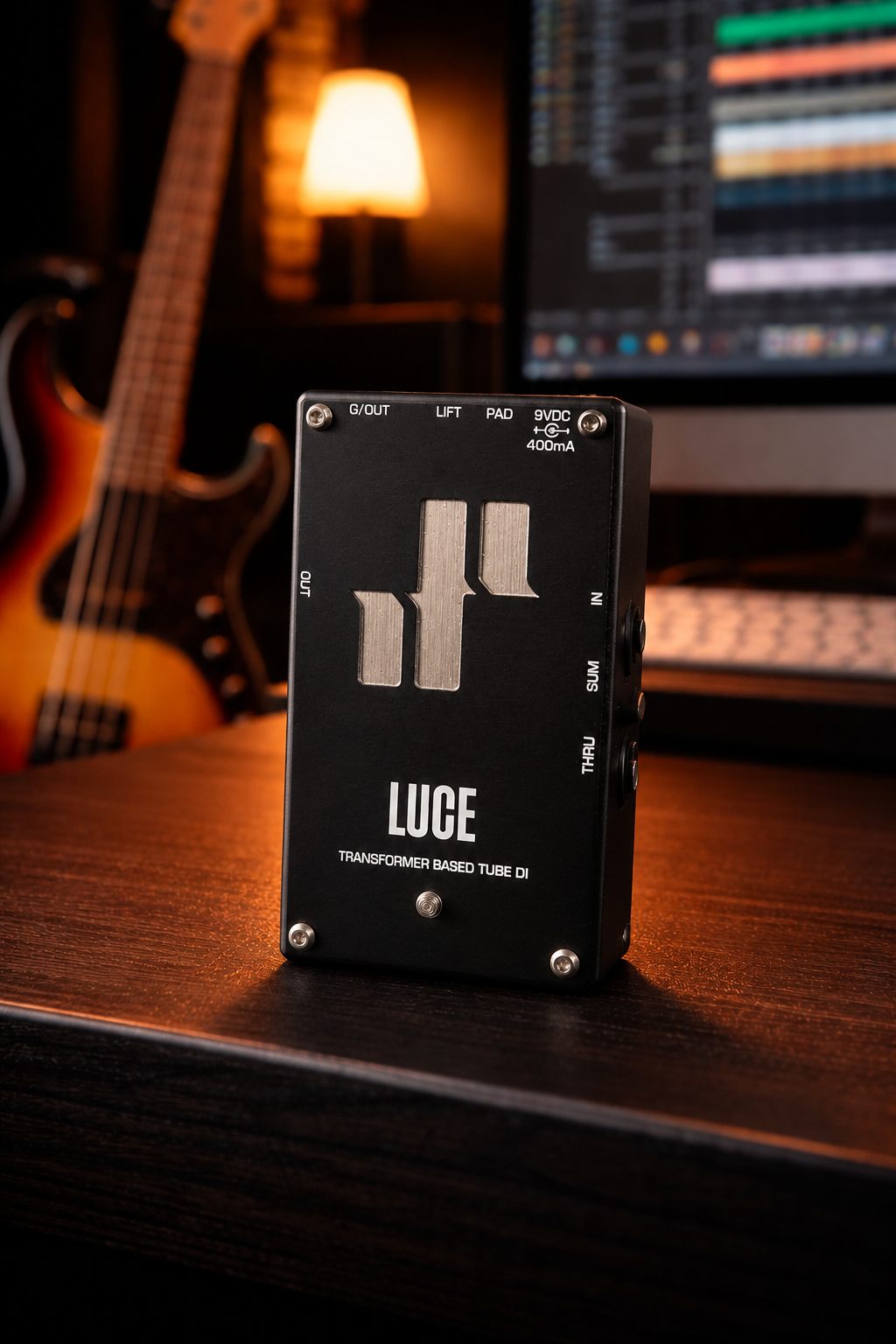
Studio Light in a Pedalboard World Jad Freer Audio didn’t appear out of nowhere. The brand first really came into the spotlight through the Capo DI, a unit that quickly gained traction in the bass community and was pushed into wider visibility by bass players like Tim Lefebvre, Sean Hurley or Chris Chaney. The Capo became known as a kind of “all-in-one modern bass front end”: a highly flexible preamp/DI with serious tone-shaping power, blending clean headroom, drive, EQ, and studio-ready output into a single, carefully designed box. For many players, it represented a new standard in what a pedalboard-friendly studio front end could do—deep, versatile, and unapologetically high-end in both sound and engineering. Disclaimer: This pedal was kindly provided by Jad Freer Audio for the purpose of this review. However, this does not influence our opinions or the content of our reviews. We strive to provide honest, unbiased, and accurate assessments to ensure that our readers receive truthful and helpful information. The LUCE is the latest release from Jad Freer Audio, but it takes a very different philosophical approach. Unlike the Capo, the LUCE is not trying to be an all-in-one solution. It doesn’t offer EQ sections, drive circuits, or complex routing options. Instead, it focuses on one specific job—and does it exceptionally well. You could think of it less as a multi-tool and more as a precision studio instrument: minimal in concept, but deeply refined in execution. And that distinction is important, because everything about the LUCE is built around restraint. It doesn’t try to reshape your sound—it tries to elevate what’s already there. “Luce — light in Italian — is a studio-quality, transformer-based tube DI (Direct Injection) box: a unity gain (1:1) tube preamplifier and active summing unit.” First of all, let’s clear out what all these things actually mean—because this one sentence pretty much tells you everything about what the LUCE is trying to be, even if the terminology isn’t immediately obvious. What is a transformer-based tube DI? Let’s break that into two parts: DI box and transformer + tube. A DI (Direct Injection) box is what lets you send your bass signal straight to a mixing console or audio interface. Instead of relying on a mic’d amp, you’re giving the sound engineer a clean, controlled version of your tone. Now, not all DIs are created equal. The transformer part A transformer is an old-school piece of analog circuitry used in classic studio gear. In practice, for bass players, it does a few subtle but important things: It’s one of those things you don’t hear as an effect—you feel it as authority in your tone. The tube part The LUCE uses a real vacuum tube (not a digital emulation), which introduces: Importantly, this isn’t distortion—it’s the kind of enhancement you associate with high-end studio recordings. Put together, “transformer-based tube DI” basically means:A DI that makes your bass sound like it’s already been through expensive studio gear. Understanding the LUCE’s Unity Gain Design One of the most misunderstood — yet most important — aspects of the Jad Freer Audio LUCE is the fact that it operates at unity gain. On paper, that can sound almost counterintuitive. Most players see the word “preamp” and immediately assume it is there to add volume, push the front of an amp harder, or dramatically reshape the sound. The LUCE approaches the idea differently. Rather than boosting or coloring the signal aggressively, the LUCE is designed to preserve the natural level of your bass while improving the quality and feel of the signal itself. That distinction is important because the pedal is less about imposing a new identity onto your tone and more about refining what is already there. In practice, the effect feels subtle at first, but very noticeable once you spend time with it. Notes become clearer and more dimensional. The low end stays controlled, but feels richer and more connected. Dynamics respond more naturally under the fingers, and there is a sense of consistency across the instrument that can make the entire rig feel more polished without sounding processed. That is ultimately what the LUCE does so well. It does not try to overwhelm your core tone with heavy EQ curves or exaggerated coloration. Instead, it enhances the integrity of the signal in a way that feels organic and musical. If your bass already sounds good, the LUCE tends to make it sound more complete rather than fundamentally different. The Role of the Tube Preamplifier The tube stage is a major part of why the pedal feels the way it does. At its core, a preamplifier is simply the first stage your signal encounters before reaching the rest of the chain — whether that is an amplifier, recording interface, or front-of-house console. In the LUCE, that stage is driven by a tube circuit, and that choice has a very real impact on the playing experience. Unlike many sterile or ultra-clinical solid-state designs, the tube reacts dynamically to touch and articulation. When you dig in harder, the response softens slightly in a pleasing way, creating a subtle compression effect that feels natural rather than obvious. Harmonics become more present, but never harsh, and the attack develops a smoother, more musical character. For bass players, that translates into an instrument that feels more alive beneath the hands. Notes carry a little more depth and dimension, while remaining articulate and controlled. Fingerstyle passages gain warmth and detail, while pick playing retains aggression without becoming brittle. The difference is not necessarily dramatic in the way a distortion pedal or EQ sweep would be. Instead, it is the kind of enhancement that changes the overall feel of the instrument and encourages you to play differently. The signal stops feeling flat or purely functional and starts responding with a sense of movement and elasticity that many players associate with high-end studio gear or vintage tube amplifiers. What is an active summing unit? This is the most technical-sounding part, but it’s actually pretty straightforward. Active summing

Reviews

Hotone Ampero II Stomp Review

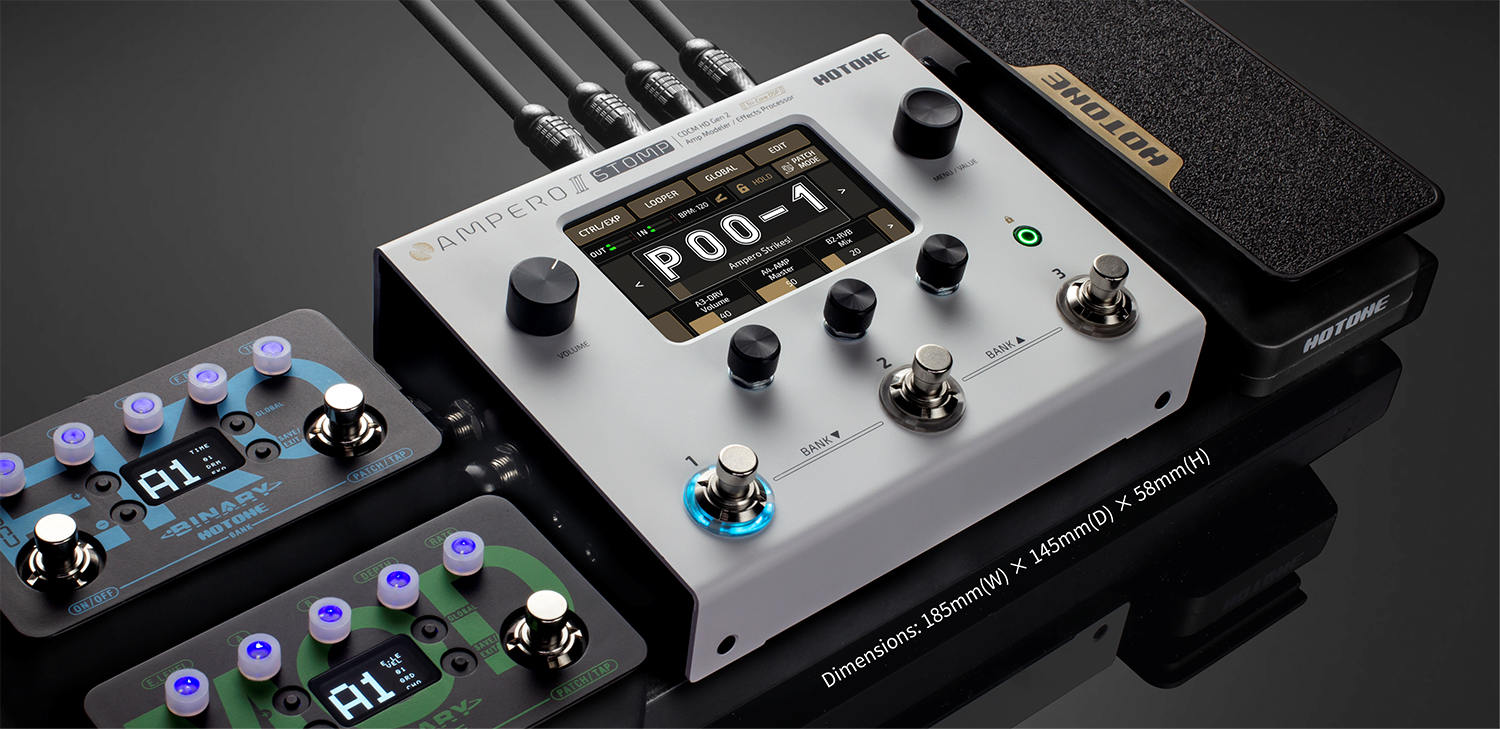
Compact size, serious routing power, and one of the most underrated bass rigs on the market. Disclaimer: This pedal was kindly provided by Hotone for the purpose of this review. However, this does not influence our opinions or the content of our reviews. We strive to provide honest, unbiased, and accurate assessments to ensure that our readers receive truthful and helpful information. There’s a very specific type of bass player the Hotone Ampero II Stomp immediately makes sense for: the player who is tired of hauling a heavy pedalboard and amp to every rehearsal, the player who wants a reliable direct solution without sacrificing feel, or the player who needs modern routing flexibility without spending flagship-modeler money. After spending serious time with the Ampero II Stomp from a bass perspective, it genuinely feels like Hotone has built one of the strongest value-for-money compact modelers currently available. Most reviews approach this unit from a guitar-first perspective, which honestly misses where the Ampero II Stomp becomes most interesting. For bass players, especially those using modern signal chains, parallel processing, IRs, and direct-to-FOH rigs, the platform offers far more than its size or price initially suggests. First Impressions The first thing that stands out is the size. The Ampero II Stomp is compact enough to fit on almost any pedalboard, but unlike many small-format modelers, it doesn’t feel compromised. The aluminum chassis feels solid, the touchscreen is responsive, and the layout feels intentionally designed for live musicians rather than simply shrinking down a larger desktop interface. That matters more than people sometimes realize. A lot of compact modelers sound excellent in demos but become frustrating during actual rehearsals or gigs because of tiny screens, awkward menu structures, or routing systems that slow everything down. The Ampero II Stomp avoids most of those issues. Within a short amount of time, editing patches starts feeling natural instead of technical, which is one of the reasons this unit works surprisingly well for bass players. Core Features The Ampero II Stomp is built around Hotone’s CDCM HD and F.I.R.E. modeling platform, running on a tri-core DSP architecture with ESS Sabre converters. In practical use, that translates into solid dynamic response, low noise operation, convincing amp feel, and cabinet simulations that sound far more polished than earlier generations of budget modelers. Hotone includes 87 amp models, 68 cabinet models, over 100 pedal models, and more than 400 effects overall. The unit supports up to 12 simultaneous effect slots alongside stereo operation, parallel and serial routing, third-party IR loading, USB audio functionality, MIDI support, a stereo effects loop, and 300 onboard presets. On paper, that already makes it competitive in the compact-modeler category, but for bass players specifically, the routing flexibility is where the unit becomes genuinely compelling. The Bass Experience The obvious question is whether the Ampero II Stomp actually works well for bass. The answer is yes, although perhaps not in the exact way some players expect. If you are looking for an ecosystem with dozens of dedicated bass amp models, ultra-deep parameter editing, and an enormous community-built preset library, the Ampero II Stomp does not fully compete with other similar ecosystems. The bass-specific content is smaller, and some of the stock presets clearly lean more toward guitar applications. However, what Hotone has built is a platform flexible enough to create excellent bass tones if you understand how modern bass rigs function. Once you stop thinking about the unit as a preset machine and start approaching it as a routing and processing platform, the Ampero II Stomp becomes significantly more impressive. Parallel Routing Is the Real Story For bass players, the real strength of the Ampero II Stomp is the routing architecture. Most experienced bass players eventually discover that distortion and heavy processing sound dramatically better when the low end remains intact. Parallel routing solves that problem, and the Ampero II Stomp makes those setups unusually easy to build. You can split clean and distorted paths, run compressed clean lows underneath aggressive drive tones, blend multiple amp models together, integrate external pedals through the effects loop, or build wet/dry ambient rigs while preserving low-frequency punch. These are the kinds of workflows that traditionally require expensive switching systems or large pedalboards, yet the Ampero II Stomp handles them internally with surprisingly little friction. What makes the experience particularly strong is the touchscreen interface. Routing feels visual and immediate instead of technical. Dragging effects around the chain, splitting paths, and adjusting blends becomes intuitive very quickly, and that ease of use gives the unit a major advantage over some menu-heavy competitors. Amp Models for Bass The bass amp selection itself is not enormous, but the core sounds are absolutely usable. The Ampeg-style models are the obvious starting point and deliver the familiar low-mid authority most players expect. Cleaner amp models also work especially well once paired with quality third-party bass IRs. That last point is important because while the stock cabinet simulations are decent, the Ampero II Stomp improves noticeably with external IRs. Once you load good bass cabinet IRs, the overall realism, depth, and mix placement improve dramatically, particularly through studio monitors or in-ear systems. The platform supports third-party IRs with up to 2048 sampling points, which helps bass cabinets retain more low-frequency realism and detail than older-generation loaders. At that point, the Ampero II Stomp starts sounding significantly more expensive than it actually is. Check Price on Amazon –> The Effects The effects section is where the experience becomes slightly more mixed, although still largely positive from a bass perspective. The compressors are solid and completely giggable, even if they do not quite reach the feel or refinement of premium standalone units. EQ options are flexible and especially valuable for direct rigs, where precise control over low mids and high-end presence becomes critical. The modulation and ambient effects are surprisingly strong. Chorus, delays, reverbs, and synth-adjacent textures work extremely well for modern bass applications, especially for worship, progressive, or cinematic styles. The Cloud reverb in particular

Walrus Mantle
Reviews

Walrus Mantle: The Long Awaited Pedal Review

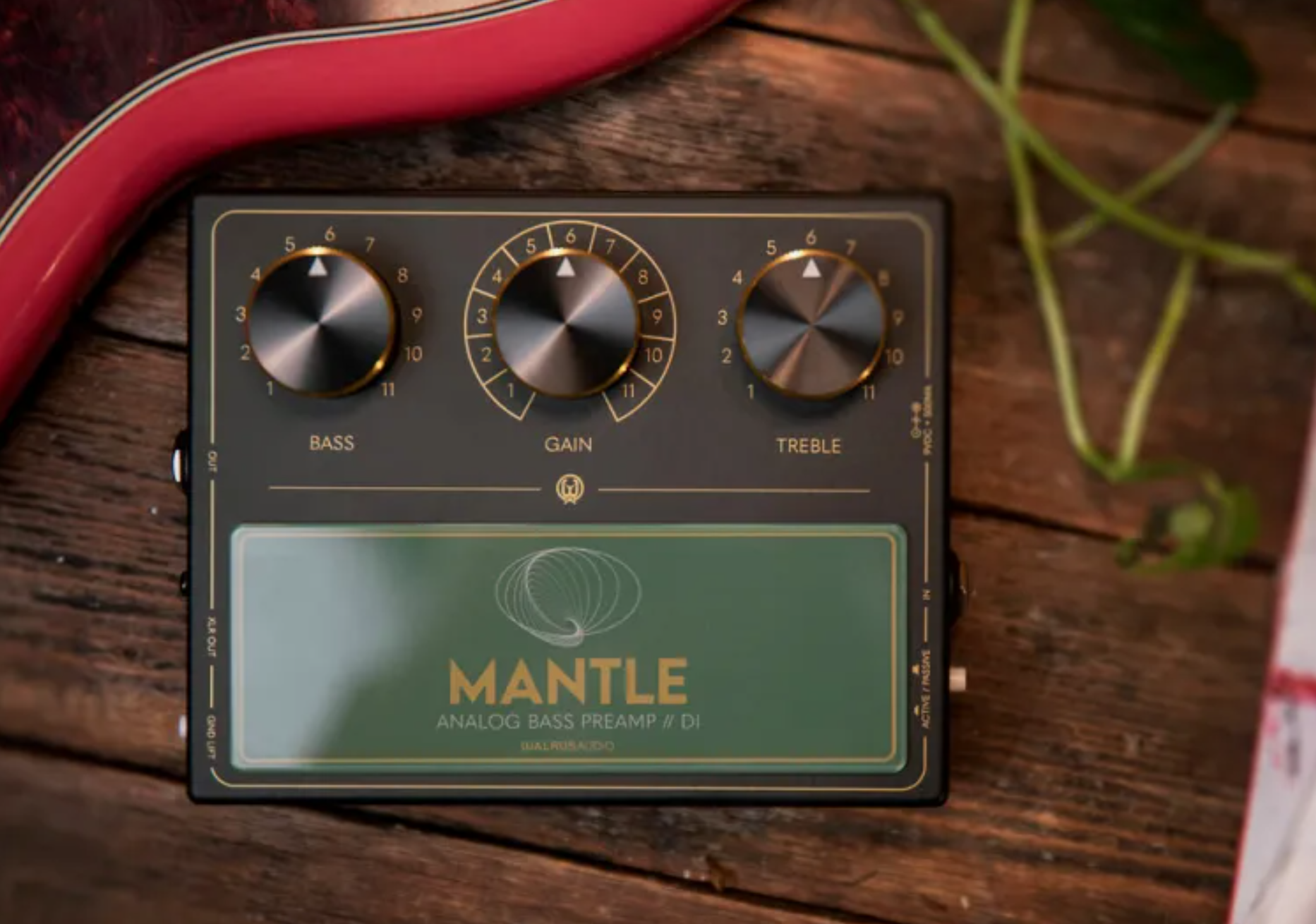
A studio-grade bass preamp in pedal form Disclaimer: This pedal was kindly provided by Walrus Audio for the purpose of this review. However, this does not influence our opinions or the content of our reviews. We strive to provide honest, unbiased, and accurate assessments to ensure that our readers receive truthful and helpful information. Nowadays, we have gear for every player, in every shape, form, and price point. Some of it turns out to be little more than hype, while other pieces quietly prove themselves to be genuinely exceptional. There is budget gear capable of producing incredible sounds, and there are ultra-boutique, expensive products that struggle to justify their price. It is in this landscape that the Mantle appears—highly visible, heavily discussed, and undeniably controversial. When Walrus Audio gave us the opportunity to review this pedal, it was an easy decision. This is exactly the kind of product we aim to explore: ambitious, polarizing, and designed with a very clear purpose. Check the price on Amazon –> Designed from a studio mindset The Mantle was developed by Ian Martin Allison in collaboration with Walrus Audio, and its design philosophy reflects that partnership clearly. Instead of chasing versatility or feature count, the pedal focuses on capturing the character and behavior of high-end studio preamps. At the heart of the Mantle is a signal path inspired by classic recording equipment. The input stage draws from Neve-style designs, known for their weight and warmth, while the output stage takes cues from API circuits, prized for their clarity and punch. This combination is not accidental. In studio environments, engineers rely on these types of preamps to shape bass tone before it even reaches EQ or compression, and the Mantle brings that philosophy directly to the pedalboard. One of the defining elements of this design is the use of custom transformers. Unlike most pedals, which rely entirely on solid-state circuitry, the Mantle incorporates transformer-based stages to add harmonic richness, depth, and low-end authority. This is part of what gives the pedal its sense of weight and helps it feel closer to studio outboard gear than to a traditional stompbox. Another important aspect of the design is headroom. Although the pedal runs on a standard 9-volt power supply, it internally operates at a much higher voltage. This allows it to handle strong signals—especially from active basses—without distorting or compressing unintentionally. In practice, this means the Mantle remains clean, open, and highly dynamic, even when pushed. A different approach to control At first glance, the Mantle appears almost too simple for a pedal in its price range. It does not offer multiple EQ bands, onboard compression, or drive circuits. Instead, it provides a focused set of controls that behave more like studio gear than like traditional pedals. The gain control is a perfect example. Rather than acting as a distortion or overdrive knob, it adjusts how hard the signal hits the internal circuitry. Increasing the gain does not create obvious breakup; instead, it enhances harmonic content, density, and presence. The result is subtle but meaningful—notes feel thicker, more solid, and more forward in a mix, without losing clarity. The EQ section consists of bass and treble controls, but these are not standard knobs. They are implemented as stepped rotary switches, each with fixed positions. The center position is flat, and each step introduces a precise amount of boost or cut. This makes the pedal highly repeatable and predictable, which is particularly valuable in studio environments. More importantly, the EQ is musical in its behavior. Boosting the low end adds weight without immediately introducing muddiness, while cutting it tightens the sound without making it feel thin. The treble control allows players to add clarity and articulation or to smooth out aggressive highs. Rather than dramatically reshaping the tone, the EQ works to refine and enhance what is already there. The pedal also includes an active/passive switch, ensuring proper input sensitivity for different instruments, and a ground lift for the DI output, making it reliable in both live and studio environments. Understanding what the Mantle actually does To fully understand the Mantle, it helps to look at how bass tone is usually handled. In many setups, the instrument goes straight into an amp or DI, and tone shaping happens later—either on the amplifier or at the mixing desk. While this works, it often means the core tone is not optimized at the source. The Mantle changes that approach completely. By placing a high-quality preamp at the very beginning of the signal chain, it allows players to define their tone before it reaches anything else. The result is a signal that already sounds finished, balanced, and intentional. This becomes especially clear when using the XLR output. Many DI signals can sound flat or sterile, particularly in recording situations. The Mantle’s transformer-based output adds depth, warmth, and harmonic complexity, making the signal feel closer to a miked amplifier. In practice, this can significantly reduce the need for processing during mixing. How it fits into a bass rig In real-world use, the Mantle can take on several roles. For many players, it becomes an always-on foundation, shaping the core tone before it hits the rest of the pedalboard. In this role, it acts almost like an extension of the instrument itself. In live settings, the built-in DI output is a major advantage. It allows bassists to send a consistent, high-quality signal directly to front-of-house, regardless of the backline. This is particularly useful in unpredictable environments where amp quality or setup may vary. For recording, the Mantle can effectively replace a traditional DI box and preamp chain, delivering a clean, detailed signal with a natural sense of weight and presence. It is also well suited to modern setups such as silent stages and in-ear monitoring, where the entire bass tone depends on the direct signal. Strengths, limitations, and expectations The Mantle’s strengths lie in its clarity, depth, and refinement. It delivers a level of tonal quality that is rare in pedal form, with

Reviews

Neural DSP Darkglass Ultimate: Plugin Review

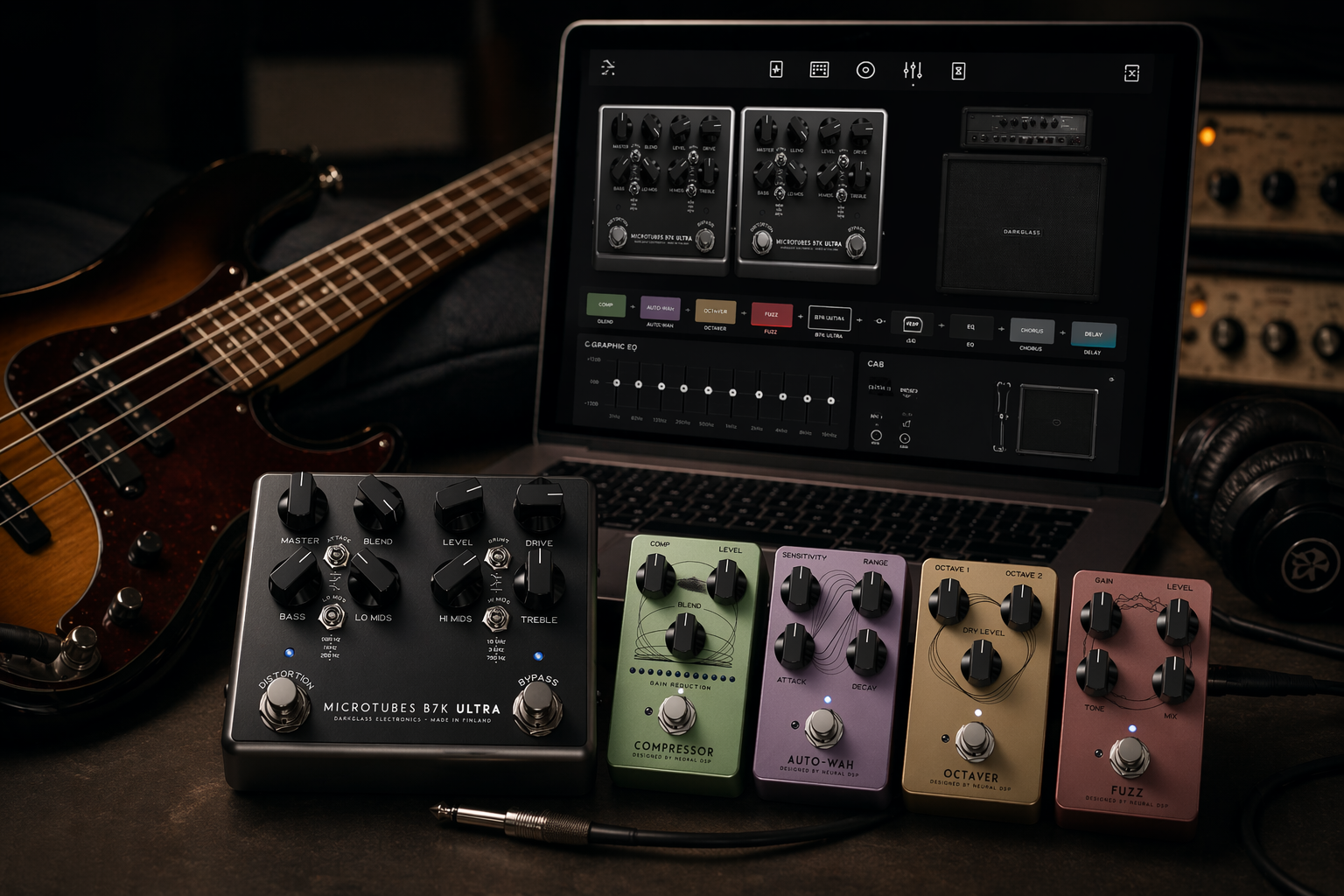
A Complete Bass Rig Evolved Neural DSP has just announced the release of Darkglass Ultimate, a new plugin that expands some of the most recognizable bass tones of the past decade into a complete, studio-ready environment. Rather than simply recreating the Darkglass sound in plugin form, Ultimate builds on the foundation of earlier releases (the Darkglass Ultra) by combining its core character with a full signal chain and creative tools, designed to take you from initial idea to a finished, mix-ready track—all within a single plugin. Neural DSP first brought the Darkglass sound into the digital domain back in 2018, capturing the essence of the B7K Ultra and Vintage Ultra in plugin form, and with Darkglass Ultimate that original concept grows into something far more comprehensive. The Darkglass sound has played a major role in shaping modern bass tone over the past decade, particularly in heavier and more progressive genres, and Darkglass Ultimate builds on that legacy while pushing it into a more complete workflow. At its core are the familiar B7K Ultra, known for its tight, aggressive drive with controlled low end and clear articulation, and the Vintage Ultra, which offers a warmer, rounder character inspired by classic tube amps. While I didn’t have a Vintage Microtubes unit on hand for a direct comparison, the B7K side feels very close to the original pedal in both response and character, which speaks to how faithfully these tones have been translated into the plugin. More importantly, the core tone still feels like a solid starting point—something you build around rather than fight against—which makes the whole process intuitive from the start. Where Darkglass Ultimate really differentiates itself is in scope, moving beyond amp simulation into a complete signal chain designed to take you from initial idea to a finished, mix-ready track without leaving the plugin. The pre-effects section includes a compressor, auto-wah, octaver, and fuzz, while post-effects cover chorus and delay, all of which feel tightly integrated into the tone-shaping process rather than added as afterthoughts. Building on this foundation of preamps and effects, the plugin also includes a wide range of presets created by both artists and the Neural DSP team, with contributions from players like Adam “Nolly” Getgood and Alex Webster highlighting its more aggressive and mix-ready capabilities. At the same time, Neural DSP’s in-house presets expand the palette further, introducing synth-like textures, ambient soundscapes, dub-inspired tones, funk-driven patches, and outright destructive fuzz sounds, making the plugin feel less like a genre-specific tool and more like a creative playground for bass. The included Darkglass cabinets—DG210C (2×10) and DG810ES (8×10)—combined with flexible mic positioning add another layer of control and realism. Between the cab section, the 9-band graphic EQ, and the onboard EQ controls inherited from the pedal designs, there’s a huge amount of flexibility when it comes to sculpting your sound, whether you’re making subtle mix adjustments or pushing things into more extreme territory. I also spent some time properly testing the effects, and this is an area where the plugin genuinely impressed me. The overall quality is very high across the board, but the delay in particular stood out. I’m not usually a big fan of delay on bass, but this one ended up being surprisingly inspiring—I lost track of time and spent a good 30 minutes just playing into it, tweaking settings and getting completely absorbed in the sound. That kind of response says more than any feature list. Darkglass Ultimate also leans into being an all-in-one environment through built-in tools like transpose, tuner, metronome, and curated presets, all of which help streamline the workflow and reduce the need to rely on external plugins. In real-world use, the plugin performs smoothly and reliably; I was able to record multiple bass examples in Ableton Live without any issues, and the tones translated well into a mix with minimal additional processing. That immediacy—being able to dial in polished, usable sounds quickly—is one of its strongest qualities. Another aspect worth highlighting is its potential beyond the studio. For those willing to bring a laptop into a live setting, integrating Darkglass Ultimate with a MIDI controller adds a powerful layer of real-time control, effectively turning the plugin into a highly flexible multi-effects unit. This opens up interesting possibilities for live performance, especially for players who want access to complex signal chains without carrying extensive hardware rigs. Ultimately, Darkglass Ultimate feels like a natural evolution of the Ultra, taking an already strong tonal foundation and expanding it into a complete production tool that simplifies the path from idea to finished sound, while also offering enough depth to reward experimentation. Darkglass Ultimate launches on April 24, 2026, alongside Neural DSP’s Birthday Sale, which includes 50% off all plugins and 30% off Archetype: John Mayer X. Darkglass Ultimate will be a free upgrade for Darkglass Ultra customers.